
QuickStart
Getting Started
 Tap to view app screenshot
- TraqFreq is the only musical instrument activity tracker that automatically monitors your playing activity. Every second counts!
- Track playing time, sessions, passages, songs, sets and more.
- TraqFreq is a small device that easily attaches on the inside or outside of your instrument. Once installed, it automatically turns on and off and detects your playing activity.
- Playing information is stored on the device and later uploaded to your phone.
- Various charts and analysis of your playing are available.
- Evaluate your playing behavior, frequency and consistency.
1. Play Time Tracking
 Tap to view app screenshot
- TraqFreq is the only musical instrument activity tracker that automatically monitors your playing activity. Every second counts!
- Track playing time, sessions, passages, songs, sets and more.
- TraqFreq is a small device that easily attaches on the inside or outside of your instrument. Once installed, it automatically turns on and off and detects your playing activity.
- Playing information is stored on the device and later uploaded to your phone.
- Various charts and analysis of your playing are available.
- Evaluate your playing behavior, frequency and consistency.
2. Tuner
 Tap to view app screenshot
TraqFreq features a unique, innovative and feature-packed tuner!
- Available on both the TV and Phone apps.
- Detection is done on the instrument and displayed via Bluetooth on a phone or TV.
- Get the best of both a clip-on and an app tuner.
- Tune to an accuracy of 0.1 cents.
- An intonation mode helps you accurately compute an intonation offset for each string.
- See the lifespan of your strings, while you tune, based on actual playing time.
- Featuring display modes for strobe, needle and both strobe and needle.
- Built-in and custom tunings and temperaments.
- Audible reference of the notes being tuned.
- Uses over 20 times less power than competing tuners!
3. Live
 Tap to view app screenshot
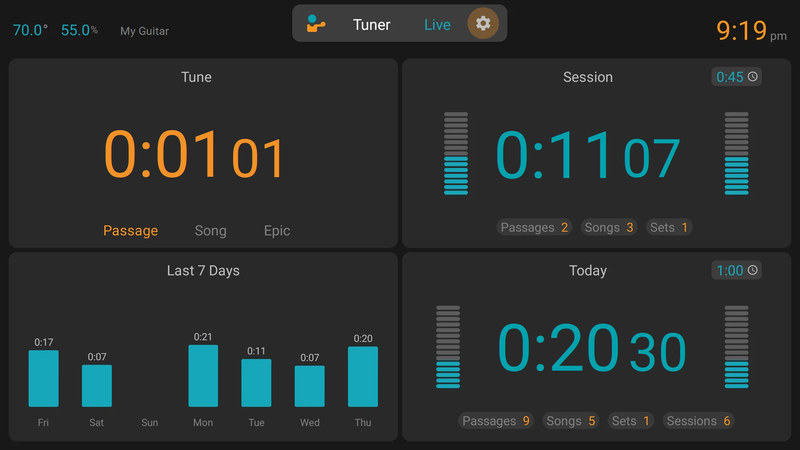
- View your playing stats in real-time as you practice or perform.
- Display real-time information updated every second, on a phone or TV, providing real-time motivation.
- See details for the current Tune, Session, Day and Week.
- Set playing limits and get notifications as you play.
- 5 display modes to help you focus on various Live playing scenarios : Practice, Health, Studio, Stage and Solo.
4. Metronome
 Tap to view app screenshot
- TraqFreq knows when you play and can automatically start and stop the Metronome as you play and stop playing.
- Tap tempo on your phone screen or on your instrument.
- Supports 18 different metronome and drum sounds.
- Create your own patterns and variations, and sequence them to form more interesting beats.
- Touch your TraqFreq to start the metronome, and touch to navigate between presets in a set list.
- Use default and custom presets, and create your own set lists.
- Metronome timing is based on actual playing time, not just metronome on time.
5. Touch
 Tap to view app screenshot
- The TraqFreq enclosure is capacitive touch sensitive. Execute various actions simply by touching your TraqFreq while you play, without having to reach for your phone.
- Touch to start and stop the TraqFreq app on your TV or phone, and display the Tuner, Live Stats or Metronome. And if your phone is locked, the Audible UI keeps you in control.
- Touch to switch between the Tuner, Live Stats and Metronome.
- Touch to navigate between presets in a Metronome set list.
- Auto Start the TraqFreq apps on your phone and TV simply by playing, so your Live Stats appear instantly.
- Touch controls both the phone app and TV app.
6. Phone and TV
 Tap to view app screenshot
- TraqFreq is a Bluetooth device that connects directly to your Phone and TV. Before, you could use TraqFreq on your phone or TV, now you can use both together.
- Supports up to 2 connections, allowing the TV and Phone apps to display your Tuner or Live Stats on both screens at the same time. Just touch TraqFreq or start playing and your results appear automatically where you need them.
- Configure the TV, Phone or both as targets, depending on your preferences.
7. Audible UI
 Tap to view app screenshot
- Not near your TV or phone? Plugged in and cannot access your locked phone easily? The Audible UI enables you to use TraqFreq without looking at a screen.
- By using the speakers on your phone, you can use the Tuner, Live Stats and Metronome, even if your phone is locked.
- The Tuner compares your current pitch to the target pitch and provides audible feedback, indicating if you are sharp or flat. And the Audible Strobe helps you get to within 0.1C accuracy without looking at a screen.
- Now you can touch Traqfreq to start or switch functions or just start playing - and see or hear the results instantly on your phone or TV.
8. Streaks
 Tap to view app screenshot
- See your latest daily playing streak.
- Also available for weekly goals, for example, you've hit your weekly goal of playing 3 times a week for 10 weeks in a row.
9. Health
 Tap to view app screenshot
- TraqFreq analyzes your playing habits and provides insights and recommendations to help you avoid or recover from injuries.
- A playing Fitness score provides an analysis of playing data and health status.
- Reveal patterns of Effort and Strain.
- Identify and regulate healthy lengths of practice and break time to recover from and/or prevent injuries.
- Get notifications when you reach your health limits for the day and week.
10. Climate
 Tap to view app screenshot
- TraqFreq provides intelleigent climate monitoring, designed specifically for musical instruments.
- Continuously monitor the temperature and humidity of your instrument.
- Set up thresholds and rules, and get notifications when conditions become a concern.
- The Climate Index is a score of a collection of rules. This represents the severity of the current and previous climate conditions.
- Perform a root cause analysis of climate issues.
- Climate data can be seen in charts, calender and table views.
- See the climate conditions specifically when you play, and when you dont.
11. Supplies
 Tap to view app screenshot
- TraqFreq precisely tracks your supply usage based on your actual playing time.
- Supplies can be strings, bows or whatever you want to track.
- Discover when to change your supply.
- Set usage zones for New, Record, Perform and Practice zones.
- See your string usage as you tune your instrument!
- Keep account of the number of supply sets you use.
- Recognize how your supplies last in varying climatic conditions.
12. Goals
 Tap to view app screenshot
- Create various goals based on actual playing time and monitor progress towards them.
- See detailed charts showing progress towards your goals.
- Define goals for weekly activity, weekly frequency, total days and total activity.
- Target playing time, sessions, passages, songs, epics and sets.
- Stay motivated and reach your goals as you progress.
13. Sharing and Reports
 Tap to view app screenshot
- View reports and send them to yourself, your parents, teachers and friends.
- Parents and teachers keep in touch with student progress as they learn to play musical instruments.
- Customize the details of reports.
- Schedule reports to be sent by email on a weekly, monthly or custom interval.
- Manually share any chart or view using the share button.
14. Records
 Tap to view app screenshot
- View a list of all-time records for playing and climate conditions.
- New records are highlighted on the main dashboard as they happen.
- Get notified when you reach a new record.
15. Timers
 Tap to view app screenshot
- Create timers and stopwatches for specific events and practice sessions.
- Timers count actual playing time, not simple wallclock duration.
- Timers run and accumulate directly on the TraqFreq device when you play, even when your phone is off.